后端开发 ASP.NET Core, AspNetCore, 工厂模式, 策略模式, 设计模式实战, 邮件发送服务, 多邮件模板, C# Web开发, 可扩展架构, 后端开发, 验证码邮件, 注册邮件, 邮件模板解耦, 代码可维护性 ASP.NET Core 工厂模式+策略模式管理多类型邮件内容实战 L X Y 2025-12-07 2026-03-16 记录使用工厂模式加策略模式解决有多个不同邮件内容的难管理的痛点 那天我正在写一个发送邮件验证码的功能,但是我开始的时候一出手就是if else,这样来判断应该发送什么内容的邮件,
项目文件
appsettings.json
appsettings.json 1 2 3 4 5 6 7 8 9 10 11 12 13 14 15 16 17 18 19 20 21 22 23 24 25 { "Logging" : { "LogLevel" : { "Default" : "Information" , "Microsoft.AspNetCore" : "Warning" } } , "ConnectionStrings" : { "DefaultConnection" : "" } , "MailSendServiceConfig" : { "Host" : "smtp.qq.com" , "Port" : 587 , "EmailLocalAddress" : "" , "keyword" : "" } , "SessionConfigure" : { "ExpirationTime" : "3" } , "CaptchaConfig" : { "CaptchaExpirationTime" : "5" } , "AllowedHosts" : "*" }
IEmailStrategy.cs 邮箱策略接口
1 2 3 4 5 6 7 8 9 namespace DaiBanShiWuList01x02.Interfaces { public interface IEmailStrategy { string Subject { get ; } string BuildBody (string captchaSTR, string effectiveTime } }
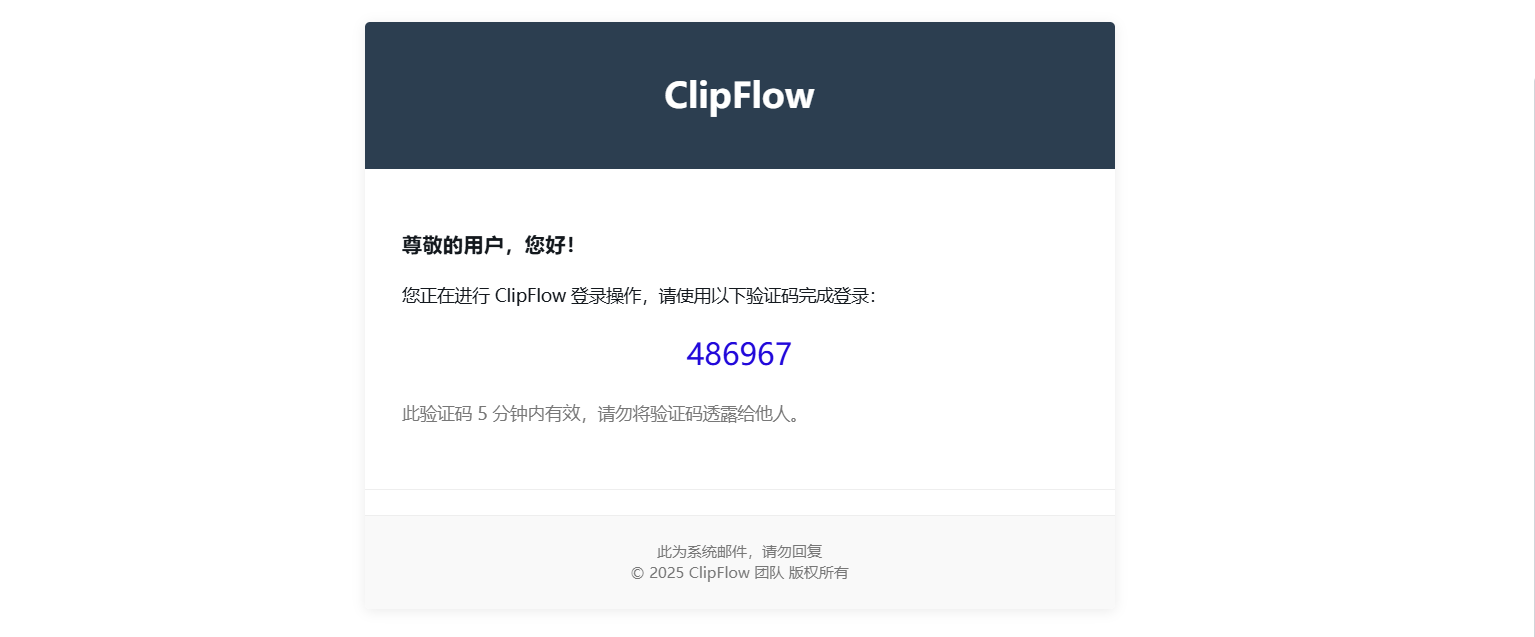
具体邮箱策略:AccountLoginEmailStrategy 1 2 3 4 5 6 7 8 9 10 11 12 13 14 15 16 17 18 19 20 21 22 23 24 25 26 27 28 29 30 31 32 33 34 35 36 37 38 39 40 41 42 43 44 45 46 47 48 49 50 51 52 53 54 55 56 57 58 59 60 61 62 63 64 65 66 67 68 69 70 71 72 73 74 75 76 77 78 79 80 81 82 83 84 85 86 87 88 89 90 91 92 93 94 using DaiBanShiWuList01x02.Interfaces;namespace DaiBanShiWuList01x02.Services.EmailStrategys { public class AccountLoginEmailStrategy : IEmailStrategy { public string Subject => "ClipFlow登录验证码" ; public string BuildBody (string captchaSTR, string effectiveTime$@" <html> <head> <meta charset=""UTF-8""> <meta name=""viewport"" content=""width=device-width, initial-scale=1.0""> <title>ClipFlow 验证码邮件</title> <style> body {{ font-family: 'Segoe UI', Tahoma, Geneva, Verdana, sans-serif; line-height: 1.6; color: #333; margin: 0; padding: 20px; background-color: #f5f5f5; }} .email-container {{ max-width: 600px; margin: 0 auto; background-color: #ffffff; border-radius: 4px; box-shadow: 0 2px 10px rgba(0, 0, 0, 0.08); overflow: hidden; }} .email-header {{ background-color: #2c3e50; color: white; padding: 20px; text-align: center; }} .email-body {{ padding: 30px; }} .email-footer {{ padding: 20px; text-align: center; font-size: 12px; color: #777; border-top: 1px solid #eee; background-color: #f9f9f9; }} .captcha-container {{ margin: 20px 0; text-align: center; }} .note {{ font-size: 14px; color: #777; margin-top: 20px; }} .divider {{ height: 1px; background-color: #eee; margin: 20px 0; }} </style> </head> <body> <div class=""email-container""> <div class=""email-header""> <h1>ClipFlow</h1> </div> <div class=""email-body""> <h3>尊敬的用户,您好!</h3> <p>您正在进行 ClipFlow 登录操作,请使用以下验证码完成登录:</p> <div class=""captcha-container""> <span style='color:rgb(34, 9, 218);font-size:24px;'>{captchaSTR} </span> </div> <div class=""note""> <p>此验证码 {effectiveTime} 分钟内有效,请勿将验证码透露给他人。</p> </div> </div> <div class=""divider""></div> <div class=""email-footer""> <p>此为系统邮件,请勿回复</p> <p>© 2025 ClipFlow 团队 版权所有</p> </div> </div> </body> </html>" ; } }
具体邮箱策略: 1 2 3 4 5 6 7 8 9 10 11 12 13 14 15 16 17 18 19 20 21 22 23 24 25 26 27 28 29 30 31 32 33 34 35 36 37 38 39 40 41 42 43 44 45 46 47 48 49 50 51 52 53 54 55 56 57 58 59 60 61 62 63 64 65 66 67 68 69 70 71 72 73 74 75 76 77 78 79 80 81 82 83 84 85 86 87 88 89 90 91 92 using DaiBanShiWuList01x02.Interfaces;namespace DaiBanShiWuList01x02.Services.EmailStrategys { public class AccountRegisterEmailStrategy :IEmailStrategy { public string Subject => "ClipFlow注册验证码" ; public string BuildBody (string captchaSTR, string effectiveTime$@" <html> <head> <meta charset=""UTF-8""> <meta name=""viewport"" content=""width=device-width, initial-scale=1.0""> <title>ClipFlow 验证码邮件</title> <style> body {{ font-family: 'Segoe UI', Tahoma, Geneva, Verdana, sans-serif; line-height: 1.6; color: #333; margin: 0; padding: 20px; background-color: #f5f5f5; }} .email-container {{ max-width: 600px; margin: 0 auto; background-color: #ffffff; border-radius: 4px; box-shadow: 0 2px 10px rgba(0, 0, 0, 0.08); overflow: hidden; }} .email-header {{ background-color: #2c3e50; color: white; padding: 20px; text-align: center; }} .email-body {{ padding: 30px; }} .email-footer {{ padding: 20px; text-align: center; font-size: 12px; color: #777; border-top: 1px solid #eee; background-color: #f9f9f9; }} .captcha-container {{ margin: 20px 0; text-align: center; }} .note {{ font-size: 14px; color: #777; margin-top: 20px; }} .divider {{ height: 1px; background-color: #eee; margin: 20px 0; }} </style> </head> <body> <div class=""email-container""> <div class=""email-header""> <h1>ClipFlow</h1> </div> <div class=""email-body""> <h3>尊敬的用户,您好!</h3> <p>您正在进行 ClipFlow 注册操作,请使用以下验证码完成验证:</p> <div class=""captcha-container""> <span style='color:rgb(34, 9, 218);font-size:24px;'>{captchaSTR} </span> </div> <div class=""note""> <p>此验证码 {effectiveTime} 分钟内有效,请勿将验证码透露给他人。</p> </div> </div> <div class=""divider""></div> <div class=""email-footer""> <p>此为系统邮件,请勿回复</p> <p>© 2025 ClipFlow 团队 版权所有</p> </div> </div> </body> </html>" ; } }
IEmailStrategyFactory.cs 邮箱策略工厂接口
1 2 3 4 5 6 7 8 namespace DaiBanShiWuList01x02.Interfaces { public interface IEmailStrategyFactory { IEmailStrategy GetEmailStrategy (string emailType ; } }
注意工厂里面的邮箱策略我的文章中仅实现了两个
如果以后要实现新的邮件策略的话,就新增一个策略类继承策略接口,然后在策略工厂中注册就行了。这种添加新功能,只需要创建新的类的方式,对于拓展和管理都非常方便。
EmailStrategyFactory.cs 邮箱策略工厂
1 2 3 4 5 6 7 8 9 10 11 12 13 14 15 16 17 18 19 20 21 22 23 24 25 26 27 28 29 30 31 using DaiBanShiWuList01x02.Interfaces;using DaiBanShiWuList01x02.Services.EmailStrategys;namespace DaiBanShiWuList01x02.Services { public class EmailStrategyFactory : IEmailStrategyFactory { private readonly Dictionary<string , IEmailStrategy> _emailStrategies; public EmailStrategyFactory () { _emailStrategies = new Dictionary<string , IEmailStrategy> { ["AccountRegister" ] = new AccountRegisterEmailStrategy(), ["PasswordForget" ] = new PasswordForgetEmailStrategy(), ["FriendVerification" ] = new FriendVerificationEmailStrategy(), ["AccountLogin" ] = new AccountLoginEmailStrategy(), ["ChangeAccountName" ] = new ChangeAccountNameEmailStrategy() }; } public IEmailStrategy GetEmailStrategy (string emailType { _emailStrategies.TryGetValue(emailType, out var strategy); return strategy; } } }
IMailSendService.cs 邮件发送服务接口
1
2
3
4
5
6
7
8
9
namespace DaiBanShiWuList01x02.Interfaces { public interface IMailSendService { void SendMailSendService (string SendToMailAdd, string captchaSTR, string emailType } }
MailSendService.cs 邮件发送服务
1 2 3 4 5 6 7 8 9 10 11 12 13 14 15 16 17 18 19 20 21 22 23 24 25 26 27 28 29 30 31 32 33 34 35 36 37 38 39 40 41 42 43 44 45 46 47 48 49 50 51 52 53 54 55 56 57 58 using DaiBanShiWuList01x02.Interfaces;using Microsoft.Extensions.Options;using System.Net.Mail;using System.Net;namespace DaiBanShiWuList01x02.Services { public class MailSendService : IMailSendService { private readonly IOptionsMonitor<MailSendServiceConfig> _mailSendServiceConfig; private readonly IOptionsMonitor<CaptchaConfig> _captchaConfig; private readonly IEmailStrategyFactory _emailStrategyFactory; public MailSendService (IOptionsMonitor<MailSendServiceConfig> mailSendServiceConfig, IEmailStrategyFactory emailStrategyFactory, IOptionsMonitor<CaptchaConfig> captchaConfig ) { _mailSendServiceConfig = mailSendServiceConfig; _emailStrategyFactory = emailStrategyFactory; _captchaConfig = captchaConfig; } public void SendMailSendService (string SendToMailAdd, string captchaSTR, string emailType { var emailStrategy = _emailStrategyFactory.GetEmailStrategy(emailType); MailMessage mailMessage = new MailMessage { From = new MailAddress(_mailSendServiceConfig.CurrentValue.EmailLocalAddress, "ClipFlow" , System.Text.Encoding.UTF8), To = { new MailAddress(SendToMailAdd) }, Bcc = { new MailAddress(SendToMailAdd) }, Subject = emailStrategy.Subject, SubjectEncoding = System.Text.Encoding.UTF8, IsBodyHtml = true , Body = $@"{emailStrategy.BuildBody(captchaSTR,_captchaConfig.CurrentValue.CaptchaExpirationTime)} " , BodyEncoding = System.Text.Encoding.UTF8 }; SmtpClient smtpClient = new SmtpClient(_mailSendServiceConfig.CurrentValue.Host, _mailSendServiceConfig.CurrentValue.Port); smtpClient.EnableSsl = true ; smtpClient.Credentials = new NetworkCredential(_mailSendServiceConfig.CurrentValue.EmailLocalAddress, _mailSendServiceConfig.CurrentValue.keyword); try { smtpClient.Send(mailMessage); } catch (Exception ex) { Console.WriteLine($"邮件发送失败: {ex.Message} " ); throw ; } } } }
CaptchaConfig.cs 验证码配置
1 2 3 4 5 6 7 8 namespace DaiBanShiWuList01x02 { public class CaptchaConfig { public string CaptchaExpirationTime { get ; set ; } } }
MailSendServiceConfig.cs 邮件发送服务配置
1 2 3 4 5 6 7 8 9 10 11 namespace DaiBanShiWuList01x02 { public class MailSendServiceConfig { public string Host { get ; set ; } public int Port { get ; set ; } public string EmailLocalAddress { get ; set ; } public string keyword { get ; set ; } } }
使用 在控制器里面声明属性:
private readonly IMailSendService _mailSendService;
1
2
3
4
public HomeController (IMailSendService mailSendService ){ _mailSendService = mailSendService; }
在控制器方法中使用:
1 _mailSendService.SendMailSendService(userAccount.Email, loginCaptchaSTR, "AccountLogin" );