在AspNetCore中理解依赖注入生命周期冲突与解决方案

在AspNetCore中理解依赖注入生命周期冲突

在 ASP.NET Core 的日常开发中,依赖注入(Dependency Injection, DI)几乎是贯穿所有功能的核心技术。而在学习 DI 时,
一个非常重要但又容易被忽略的问题就是 服务生命周期(Service Lifetime)之间的冲突。

这篇文章通过一个简单的 后台托管服务(BackgroundService) 示例,来展示不同生命周期的服务在注入时会出现什么问题,以及如何正确解决这种冲突。

生命周期的三种类型

在 ASP.NET Core 中,服务的生命周期有三种类型:

  1. Transient:每次请求都会创建一个新的实例
  2. Scoped:每次请求都会创建一个新的实例,但同一个请求中的不同控制器会共享同一个实例
  3. Singleton:整个应用程序中只有一个实例,所有请求都会共享这个实例

而后台托管服务(BackgroundService)是 ASP.NET Core 中用于在后台运行异步任务的抽象基类。
本文中选择它为案例是因为后台托管任务的生命周期是singleton。

依赖注入的常用方式

在 ASP.NET Core 中,依赖注入的常用方式有三种:

  1. 构造函数注入(Constructor Injection)

    1
    2
    3
    4
    5
    6
    7
    8
    9
    10
    11
       public class TestHostedService : BackgroundService
    {
    private readonly ILogger<TestHostedService> _logger;
    private readonly IIdGenService _idGenService;

    public TestHostedService(ILogger<TestHostedService> logger, IIdGenService idGenService)
    {
    _logger = logger;
    _idGenService = idGenService;
    }
    }
  2. 属性注入(Property Injection)
    在注册服务时,需要使用 ActivatorUtilities 或 ConfigureServices 配置 才能给它写入属性

    1
    2
    3
    4
    5
    6
    7
    8
    9
       public class MyService
    {
    public ILogger<MyService>? Logger { get; set; }

    public void DoWork()
    {
    Logger?.LogInformation("Working...");
    }
    }
  3. 方法注入(Method Injection)

    1
    2
    3
    4
    5
    6
    7
    8
    9
    public class MyController : Controller
    {
    public IActionResult Index([FromServices] IIdGenService idGenService)
    {
    string id = idGenService.NewGuid();
    return Ok(id);
    }
    }

其中构造函数注入和属性注入是比较常见的,而方法注入则比较少见。建议使用构造函数注入,因为它更方便,更安全。
方法和属性注入在这里就是补充说明一下,因为它们的使用场景比较少,所以这里就不再深入讲解了。

示例代码:一个依赖 IdGenService 的后台定时任务

1
2
3
4
5
6
7
8
9
10
11
12
13
14
15
16
17
18
19
20
21
22
23
24
25
26
27
28
29
30
31
32
33
34
35
36
37
38
39
40
41
42
43
using Microsoft.EntityFrameworkCore;

namespace TestEFc_IEQable_AspNetCore01x02
{
public class TestHostedService : BackgroundService
{
private readonly ILogger<TestHostedService> _logger;
private readonly IIdGenService _idGenService;
private int _executionCount;

public TestHostedService(ILogger<TestHostedService> logger, IIdGenService idGenService)
{
_logger = logger;
_idGenService = idGenService;
}
protected override async Task ExecuteAsync(CancellationToken stoppingToken)
{
_logger.LogInformation("定时托管服务启动.");
await DoWork();
using PeriodicTimer timer = new(TimeSpan.FromSeconds(10));
try
{
while (await timer.WaitForNextTickAsync(stoppingToken))
{
await DoWork();
}
}
catch (OperationCanceledException)
{
_logger.LogInformation("定时托管服务已停止.");
}
}

private async Task DoWork()
{
string id = await _idGenService.NewGuidAsync(5);
_logger.LogInformation($"生成Id: {id}");
int count = Interlocked.Increment(ref _executionCount);
await Task.Delay(TimeSpan.FromSeconds(2));
_logger.LogInformation("定时托管服务运行 {Count}", count);
}
}
}

在Program.cs中注册服务

1
2
3
4
5
builder.Services.AddHostedService<TestHostedService>();

//builder.Services.AddTransient<IIdGenService, IdGenService>();
//builder.Services.AddScoped<IIdGenService, IdGenService>();
//builder.Services.AddSingleton<IIdGenService, IdGenService>();

在这段代码中,我们注册了后台托管服务 TestHostedService,并使用不同的生命周期类型注册了 IdGenService。
重点是 IIdGenService 的生命周期不同会带来不同效果。

我们先分别解除注释,看看使用情况:

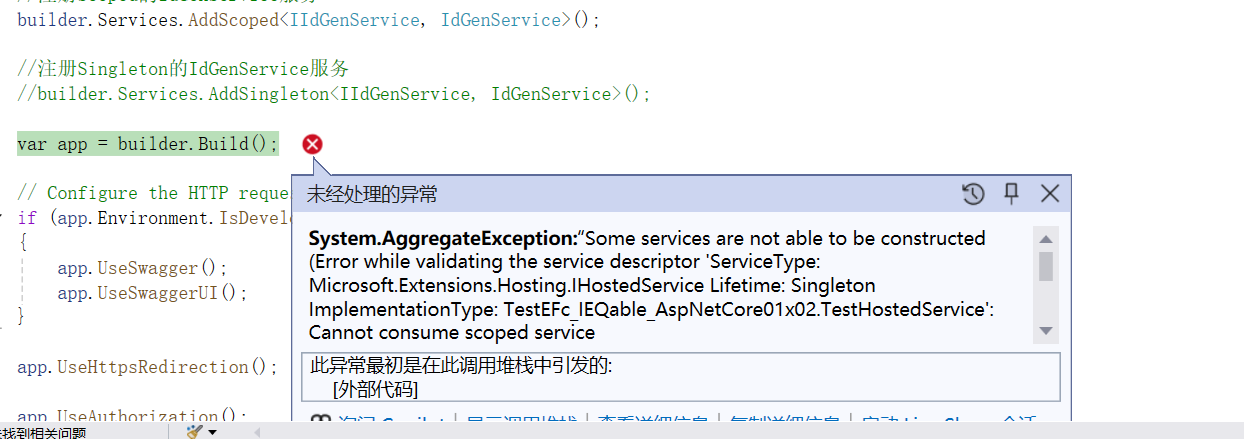
解除 Scoped 的注释
出现了报错
运行截图:
ghjnd

核心原因是:ASP.NET Core 的 后台托管服务(HostedService)默认是 Singleton(单例)DI 不允许 生命周期长的服务依赖生命周期短的服务
因为这会产生所谓的:捕获(capture)一个比自身短生命周期的依赖,可能导致依赖被提前销毁或状态错误。
例如在后台托管服务中直接注入DbContext,就会出现这种情况。因为DbContext的生命周期默认是Scoped,而导致后台托管服务在使用完这一个DbContext后,却还一直持有,
占用数据库连接,导致数据库连接池耗尽。

Singleton 服务 在整个程序生命周期都活着,它不能依赖随时都可能被释放的 Transient 或 Scoped 服务。

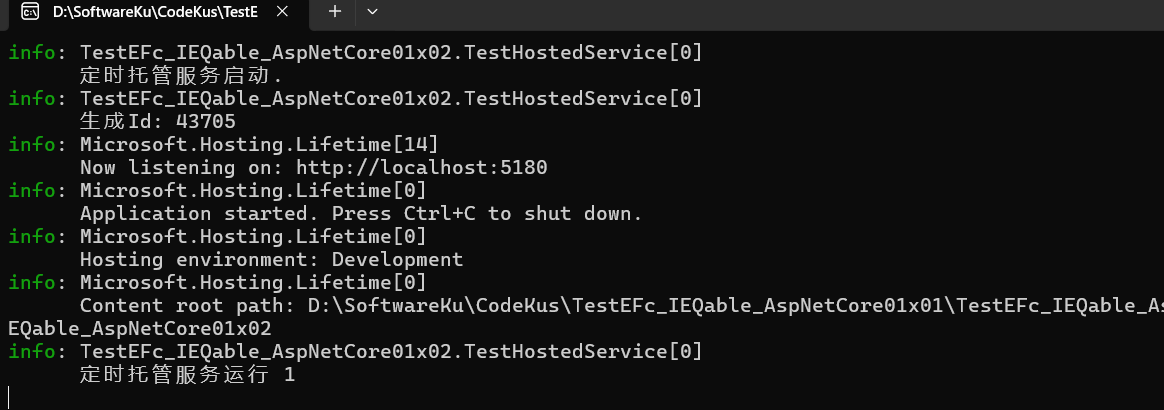
然后我们把Scoped注释掉,再解除Singleton的注释
发现正常运行:
运行截图:
sbfvr

因为这时IdGenService是与托管服务TestHostedService是同一个生命周期,所以没有问题。

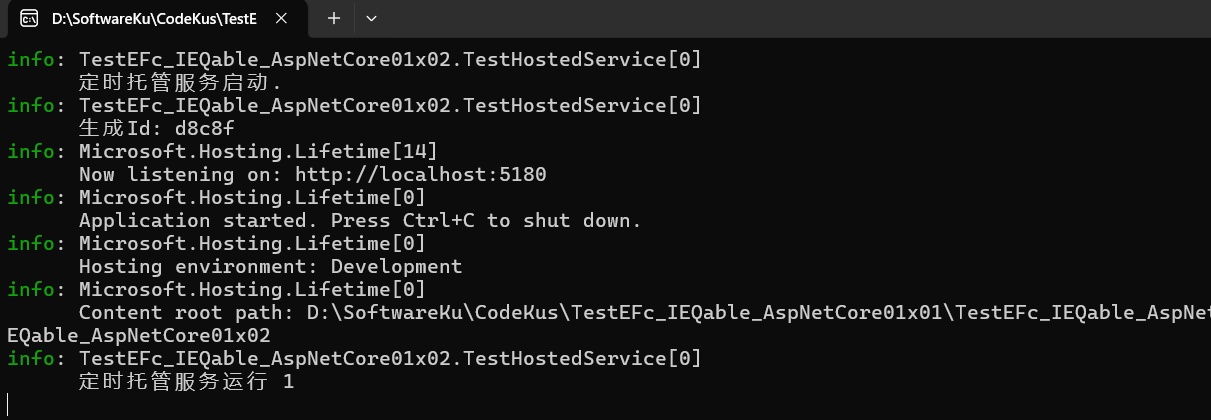
上面说了,长的生命周期不允许依赖短的生命周期,那我们猜一下解除 Transient 的注释会发生什么?
运行截图:
sdfhbk

(⊙o⊙)?不对,怎么是正常的?

我去查了一下:原来在ASP.NET Core 的 DI 系统中,Transient 是不受生命周期“捕获”规则限制的。

微软官方定义如下(简化):

Transient 服务每次请求都会重新创建,容器允许它被任何生命周期的服务注入。

也就是说:

. Transient 本身没有“作用域”

. 它也不依赖容器来管理生命周期

. 所以不会产生“被提前释放”的风险

因此:
单例依赖 Transient 是安全的(没有生命周期冲突)

那为什么大家都以为 Transient 会报错?

因为很多教程、中文文章、视频讲解都把 Scoped 和 Transient 混在一起,以为这两者都「生命周期短 → 都不能给单例用」。

但实际情况是:

生命周期 是否允许被 Singleton 依赖? 原因
Singleton 同生命周期 / 更长
Transient 不依赖 Scope,由容器直接 new
Scoped 必须在 Scope 内创建(Http Request)

那如果我们非要在 Singleton 中注入 Scoped 呢?

解决方案

使用 using 和 IServiceScopeFactory 来创建一个临时的 Scoped 作用域

1
2
3
4
5
6
7
8
9
10
11
12
13
14
15
16
17
18
19
20
21
22
23
24
25
26
27
28
29
30
31
32
33
34
35
36
37
38
39
40
41
42
43
44
45
46
47
48
49
50
51
52
53
54
55
56
57
using Microsoft.EntityFrameworkCore;

namespace TestEFc_IEQable_AspNetCore01x02
{
public class TestHostedService : BackgroundService
{
private readonly ILogger<TestHostedService> _logger;
private readonly IServiceScopeFactory _serviceScopeFactory;//看这里
private int _executionCount;

public TestHostedService(ILogger<TestHostedService> logger, IServiceScopeFactory serviceScopeFactory)
{
_logger = logger;
_serviceScopeFactory = serviceScopeFactory;
}
protected override async Task ExecuteAsync(CancellationToken stoppingToken)
{
_logger.LogInformation("定时托管服务启动.");
await DoWork();
using PeriodicTimer timer = new(TimeSpan.FromSeconds(10));
try
{
while (await timer.WaitForNextTickAsync(stoppingToken))
{
await DoWork();
}
}
catch (OperationCanceledException)
{
_logger.LogInformation("定时托管服务已停止.");
}
}

private async Task DoWork()
{
//看这里
///<using和IServiceScopeFactory>
using var scope = _serviceScopeFactory.CreateScope();
var dateContext = scope.ServiceProvider.GetRequiredService<DateContext>();
///<using和IServiceScopeFactory/>

var toDoList = await dateContext.ToDoListTable
.Include(t => t.TransactionNodes)
.FirstOrDefaultAsync(x => x.Id == "1ca");

_logger.LogInformation($"ToDoList Id:{toDoList.Id}, Title:{toDoList.ListTitle}, Description:{toDoList.ListDescription}, State:{toDoList.State}");

foreach (var item in toDoList.TransactionNodes)
{
_logger.LogInformation($"TransactionNode Id:{item.Id}, SerialNumber:{item.SerialNumber}, Content:{item.Content}, State:{item.State}");
}
int count = Interlocked.Increment(ref _executionCount);
await Task.Delay(TimeSpan.FromSeconds(2));
_logger.LogInformation("定时托管服务运行 {Count}", count);
}
}
}

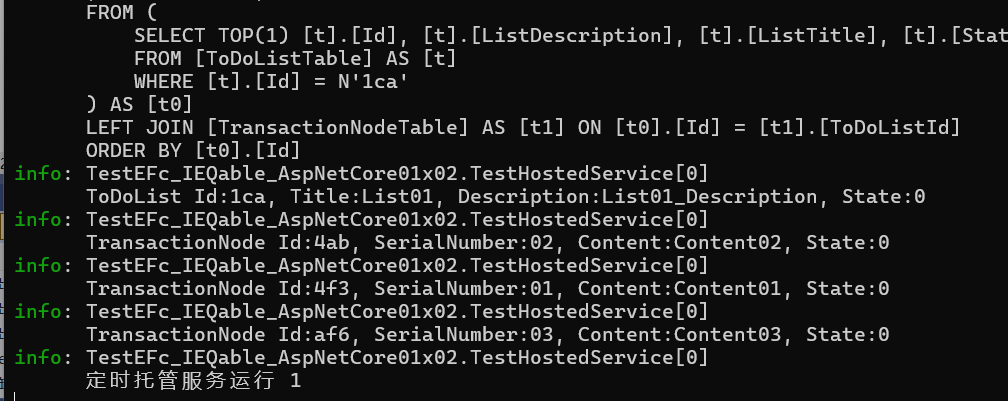
这样就解决了,运行截图:

aishdbvc