后端开发 ASP.NET Core, AspNetCore, EF Core, 通用仓储模式, IRepository泛型, RepositoryBase, C# 数据库封装, 泛型仓储接口, 数据访问层设计, 依赖注入实战, 后端开发, 数据库CRUD封装, DbContext配置, IOptionsMonitor用法 AspNetCore + EF Core实现通用仓储模式(IRepository泛型封装 L X Y 2025-09-25 2026-02-16 在AspNetCore中设计通用仓储接口 对于一个项目来说,数据库的增删改查操作是必不可少的,而对于一个项目来说,数据库的增删改查操作是必不可少的,
需要安装的包 1 2 3 Microsoft.EntityFrameworkCore Microsoft.EntityFrameworkCore.SqlServer Microsoft.EntityFrameworkCore.Tools
配置数据库连接字符串——参考之前的文章AspNetCore读取配置文件的方案四 1 2 3 4 5 6 7 8 9 10 11 12 { "Logging": { "LogLevel": { "Default": "Information", "Microsoft.AspNetCore": "Warning" } }, "SqlServerConfig": { "ConnectionString": "Server = (localdb)\\mssqllocaldb;DataBase = APIEFcTYCCJK02x02Db01;Trusted_Connection = true;TrustServerCertificate = true;" }, "AllowedHosts": "*" }
为其创建配置类 1 2 3 4 5 6 7 8 namespace APIEFcTYCCJK02x02 { public class SqlServerConfig { public string ConnectionString { get ; set ; } } }
在Program.cs中添加配置,这里需要注意的是,这里的配置类需要在服务容器中注册,否则无法使用IOptionsMonitor 1 2 builder.Services.AddOptions<SqlServerConfig>(); builder.Services.Configure<SqlServerConfig>(builder.Configuration.GetSection("SqlServerConfig" ));
创建实体模型类 1 2 3 4 5 6 7 8 9 10 11 12 13 14 15 using System.ComponentModel.DataAnnotations.Schema;using System.ComponentModel.DataAnnotations;namespace APIEFcTYCCJK02x02 { public class TestDataTable01 { [Key ] [DatabaseGenerated(DatabaseGeneratedOption.None) ] [MaxLength(50) ] public string Id { get ; set ; } public string Name { get ; set ; } public string Password { get ; set ; } public string Description { get ; set ; } } }
创建数据库上下文类 1 2 3 4 5 6 7 8 9 10 11 using Microsoft.EntityFrameworkCore;namespace APIEFcTYCCJK02x02 { public class DataContext :DbContext { public DataContext (DbContextOptions<DataContext> options ) : base (options ) public DbSet<TestDataTable01> TestDataTable01s { get ; set ; } } }
在Program.cs中添加服务,这里需要注意的是,这里的数据库上下文类需要在服务容器中注册,否则无法使用IOptionsMonitor 这里需从服务容器中获取IOptionsMonitor,所以这一步必须在数据库字符串配置类的注册之后,否则会报错。
1 2 3 4 5 builder.Services.AddDbContext<DataContext>((serviceProvider, options) => { var sqlServerConfig = serviceProvider.GetRequiredService<IOptionsMonitor<SqlServerConfig>>().CurrentValue; options.UseSqlServer(sqlServerConfig.ConnectionString); });
创建通用仓储接口IRepositoryBase 1 2 3 4 5 6 7 8 9 10 11 12 13 namespace APIEFcTYCCJK02x02 { public interface IRepositoryBase <T > { Task<IEnumerable<T>> GetAllAsync(); Task<T> GetByIdAsync (string id ; Task AddAsync (T entity ) ; Task UpdateByIdAsync (string id, T entity ; Task DeleteByIdAsync (string id ; Task<bool > IsEmptyAsync (string id ; Task<bool > SaveChangesAsync () ; } }
创建仓储实现类RepositoryBase 这里的泛型T是实体模型类,所以需要在构造函数中注入数据库上下文类DataContext,注意是DataContext,不是DbContext,
1 2 3 4 5 6 7 8 9 10 11 12 13 14 15 16 17 18 19 20 21 22 23 24 25 26 27 28 29 30 31 32 33 34 35 36 37 38 39 40 41 42 43 44 45 46 47 48 49 50 51 52 53 54 55 56 57 using Microsoft.EntityFrameworkCore;namespace APIEFcTYCCJK02x02 { public class RepositoryBase <T >: IRepositoryBase <T > where T : class { private readonly DataContext _context; public RepositoryBase (DataContext context ) { _context = context; } public async Task AddAsync (T entity ) { await _context.Set<T>().AddAsync(entity); } public async Task <IEnumerable <T >> GetAllAsync () { return await _context.Set<T>().ToListAsync(); } public async Task <T > GetByIdAsync (string id { return await _context.Set<T>().FindAsync(id); } public async Task<bool > SaveChangesAsync () { return (await _context.SaveChangesAsync() > 0 ); } public async Task UpdateByIdAsync (string id, T entity { var entityUpdate = await _context.Set<T>().FindAsync(id); if (entityUpdate != null ) { _context.Entry(entityUpdate).CurrentValues.SetValues(entity); } } public async Task DeleteByIdAsync (string id { var entity = await _context.Set<T>().FindAsync(id); if (entity != null ) { _context.Set<T>().Remove(entity); } } public async Task<bool > IsEmptyAsync (string id { var entity = await _context.Set<T>().FindAsync(id); if (entity == null ) { return true ; } return false ; } } }
在Program.cs中添加仓储实现类 1 builder.Services.AddScoped(typeof (IRepositoryBase<>), typeof (RepositoryBase<>));
再为TestDataTable01创建一个具体的,不通用的仓储实现类,来解决一些特殊的,通用仓储接口无法实现的需求 如对其密码的验证,密码修改等,这种需求可以通过继承通用仓储实现类来解决。先创建具体的仓储接口,然后再创建具体的仓储实现类,
1 2 3 4 5 6 7 8 9 10 namespace APIEFcTYCCJK02x02 { public interface ITestDataTableRepository :IRepositoryBase <TestDataTable01 > { Task<bool > VerifyPasswordAsync (string id, string password ; Task<bool > ChangePasswordAsync (string id, string oldPassword, string newPassword ; } }
注意在具体的仓储实现类中,需要注入数据库上下文类DataContext,因为需要使用到数据库上下文类DataContext,
注意是DataContext,不是DbContext,
1 2 3 4 5 6 7 8 9 10 11 12 13 14 15 16 17 18 19 20 21 22 23 24 25 26 27 28 29 30 31 32 33 34 35 36 using APIEFcTYCCJK02x02;namespace APIEFcTYCCJK02x02 { public class TestDataTableRepository : RepositoryBase <TestDataTable01 >,ITestDataTableRepository { public DataContext _context { get ; set ; } public TestDataTableRepository (DataContext context ):base (context ) public async Task<bool > VerifyPasswordAsync (string id, string password { var entity = await _context.Set<TestDataTable01>().FindAsync(id); if (entity == null ) { return false ; } return entity.Password == password; } public async Task<bool > ChangePasswordAsync (string id, string oldPassword, string newPassword { var entity = await _context.Set<TestDataTable01>().FindAsync(id); if (entity == null ) { return false ; } if (entity.Password != oldPassword) { return false ; } entity.Password = newPassword; await _context.SaveChangesAsync(); return true ; } } }
这个具体的仓储接口同样需要在Program.cs中注册 1 builder.Services.AddScoped<ITestDataTableRepository, TestDataTableRepository>();
在控制器中使用 通用仓储接口IRepositoryBase,具体的仓储接口ITestDataTableRepository,都是在Program.cs中注册的,
注意:
一次传多个参数使用[FromForm],一次传一个参数使用[FromBody]。
IActionResult不包含返回值的类型信息,所以这里使用ActionResult。
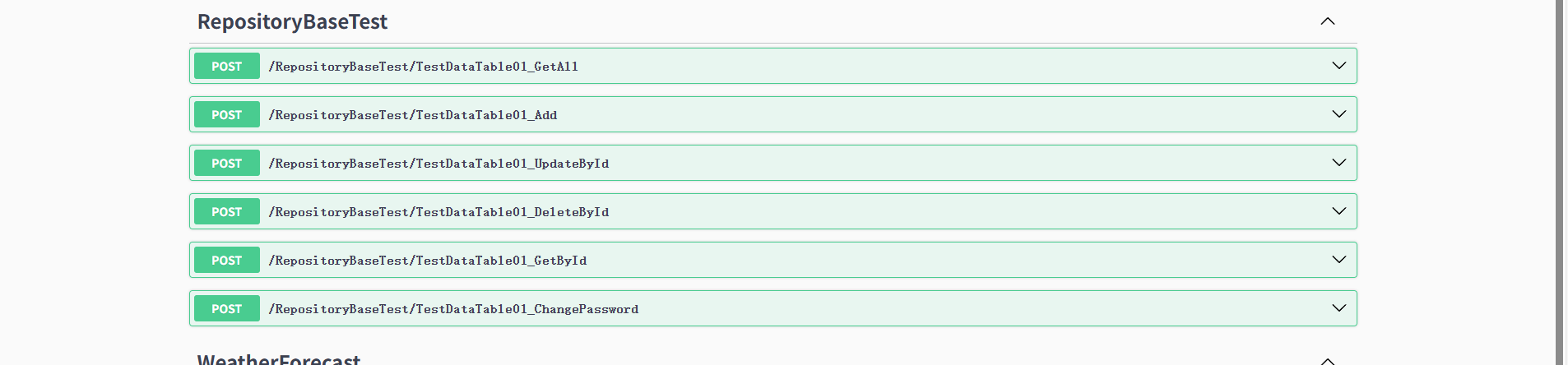
1 2 3 4 5 6 7 8 9 10 11 12 13 14 15 16 17 18 19 20 21 22 23 24 25 26 27 28 29 30 31 32 33 34 35 36 37 38 39 40 41 42 43 44 45 46 47 48 49 50 51 52 53 54 55 56 57 58 59 60 61 62 63 64 65 66 67 68 69 70 71 72 73 74 75 76 77 78 79 80 81 82 83 84 85 86 87 88 89 90 91 92 93 94 95 96 97 98 using Microsoft.AspNetCore.Http;using Microsoft.AspNetCore.Mvc;namespace APIEFcTYCCJK02x02.Controllers { [Route("[controller]/[action]" ) ] [ApiController ] public class RepositoryBaseTestController : ControllerBase { private readonly IRepositoryBase<TestDataTable01> _repositoryBase; private readonly ITestDataTableRepository _testDataTableRepository; public RepositoryBaseTestController (IRepositoryBase<TestDataTable01> repositoryBase, ITestDataTableRepository testDataTableRepository ) { _repositoryBase = repositoryBase; _testDataTableRepository = testDataTableRepository; } [HttpPost ] public async Task<IEnumerable<TestDataTable01>> TestDataTable01_GetAllAsync() { return await _repositoryBase.GetAllAsync(); } [HttpPost ] public async Task<ActionResult<string >> TestDataTable01_AddAsync([FromBody] TestDataTable01 testDataTable01) { if (await _repositoryBase.IsEmptyAsync(testDataTable01.Id.ToString()) == false ) { return BadRequest("ID已存在" ); } await _repositoryBase.AddAsync(testDataTable01); await _repositoryBase.SaveChangesAsync(); return Ok("成功添加" ); } [HttpPost ] public async Task<ActionResult<string >> TestDataTable01_UpdateByIdAsync([FromBody] TestDataTable01 testDataTable01) { if (await _repositoryBase.IsEmptyAsync(testDataTable01.Id.ToString()) == true ) { return BadRequest("ID不存在" ); } if (await _testDataTableRepository.VerifyPasswordAsync(testDataTable01.Id.ToString(), testDataTable01.Password) == false ) { return BadRequest("密码错误" ); } await _repositoryBase.UpdateByIdAsync(testDataTable01.Id.ToString(),testDataTable01); await _repositoryBase.SaveChangesAsync(); return Ok("成功更新" ); } [HttpPost ] public async Task<ActionResult<string >> TestDataTable01_DeleteByIdAsync([FromForm] string id,string password) { if (await _repositoryBase.IsEmptyAsync(id.ToString()) == true ) { return BadRequest("ID不存在" ); } if (await _testDataTableRepository.VerifyPasswordAsync(id.ToString(), password) == false ) { return BadRequest("密码错误" ); } await _repositoryBase.DeleteByIdAsync(id.ToString()); await _repositoryBase.SaveChangesAsync(); return Ok("成功删除" ); } [HttpPost ] public async Task<ActionResult<TestDataTable01>> TestDataTable01_GetByIdAsync([FromBody] string id) { if (await _repositoryBase.IsEmptyAsync(id.ToString()) == true ) { return BadRequest("ID不存在" ); } return Ok(await _repositoryBase.GetByIdAsync(id.ToString())); } [HttpPost ] public async Task<ActionResult<string >> TestDataTable01_ChangePasswordAsync([FromForm] string id,string oldPassword,string newPassword) { if (await _repositoryBase.IsEmptyAsync(id.ToString()) == true ) { return BadRequest("ID不存在" ); } if (await _testDataTableRepository.VerifyPasswordAsync(id.ToString(), oldPassword) == false ) { return BadRequest("密码错误" ); } if (await _testDataTableRepository.ChangePasswordAsync(id.ToString(), oldPassword, newPassword) == false ) { return BadRequest("修改失败" ); } return Ok("修改成功" ); } } }
最后讲一个小知识。post与get,delete,put的区别,post不是幂等,多次调用会创建多个资源,而get,delete,put是幂等的,多次调用不会改变资源的状态。
完整的Program.cs 1 2 3 4 5 6 7 8 9 10 11 12 13 14 15 16 17 18 19 20 21 22 23 24 25 26 27 28 29 30 31 32 33 34 35 36 37 38 39 40 41 42 43 44 45 46 47 48 49 50 51 52 53 using APIEFcTYCCJK02x02;using Microsoft.EntityFrameworkCore;using Microsoft.Extensions.Options;var builder = WebApplication.CreateBuilder(args);builder.Services.AddControllers(); builder.Services.AddEndpointsApiExplorer(); builder.Services.AddSwaggerGen(); builder.Services.AddOptions<SqlServerConfig>(); builder.Services.Configure<SqlServerConfig>(builder.Configuration.GetSection("SqlServerConfig" )); builder.Services.AddDbContext<DataContext>((serviceProvider, options) => { var sqlServerConfig = serviceProvider.GetRequiredService<IOptionsMonitor<SqlServerConfig>>().CurrentValue; options.UseSqlServer(sqlServerConfig.ConnectionString); }); builder.Services.AddScoped(typeof (IRepositoryBase<>), typeof (RepositoryBase<>)); builder.Services.AddScoped<ITestDataTableRepository, TestDataTableRepository>(); var app = builder.Build();var sqlServerConfig = app.Services.GetRequiredService<IOptionsMonitor<SqlServerConfig>>().CurrentValue;Console.WriteLine("SQLserver连接字符串: " + sqlServerConfig.ConnectionString); app.UseSwagger(); app.UseSwaggerUI(); app.UseHttpsRedirection(); app.UseAuthorization(); app.MapControllers(); app.Run();