.video-container {
position: relative;
width: 100%;
padding-top: 56.25%; /* 16:9 aspect ratio (height/width = 9/16 * 100%) */
}
.video-container iframe {
position: absolute;
top: 0;
left: 0;
width: 100%;
height: 100%;
}
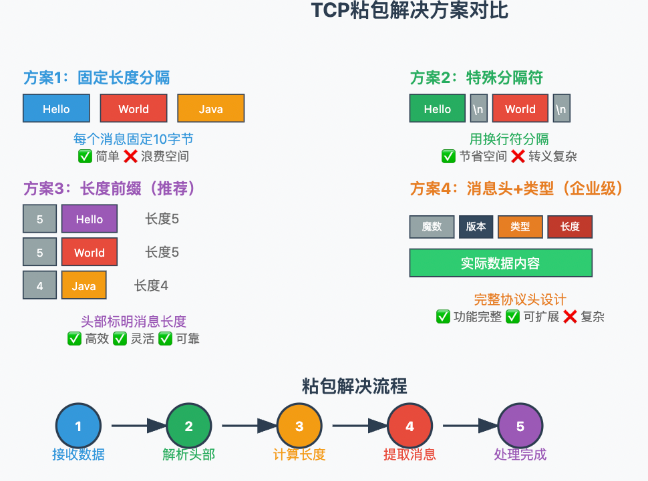
什么是粘包? 是指如果当发送端快速发送多条数据,但是接收端没有及时调用Receive,那么数据会在接收端的缓存中积累。
例如:当发送端先发送“1,2,3,4”四个字节,紧接着又发送“5,6,7,8”四个字节的数据;等到接收端调用Receive的时候,接收端的操作系统已经将接收到的全部数据写入缓存区,共接收到“8”个字节。
什么是半包? 也就是当发送端发送的数据太长了,但是接收端的缓存区没有足够的空间接收全部数据,就会接收一部分数据,另一
部分等下一次调用Receive的时候在接收 ...

.video-container {
position: relative;
width: 100%;
padding-top: 56.25%; /* 16:9 aspect ratio (height/width = 9/16 * 100%) */
}
.video-container iframe {
position: absolute;
top: 0;
left: 0;
width: 100%;
height: 100%;
}
创建C#“控制台应用(.net framework)”注意项目名为CsToSqlTest02,或者自行去改变命名空间。 这段代码是一个C#控制台应用程序,它允许用户通过命令行界面与一个SQL Server数据库进行交互。程序提供了两个主要功能:向数据库插入数据(INSERT)和从数据库查询数据(SELECT)。
完整代码如下:123456789101112131415161718192021222324252627282930313233343536373839404142434 ...
.video-container {
position: relative;
width: 100%;
padding-top: 56.25%; /* 16:9 aspect ratio (height/width = 9/16 * 100%) */
}
.video-container iframe {
position: absolute;
top: 0;
left: 0;
width: 100%;
height: 100%;
}
C#与SMTP服务简单应用代码如下: 主要是注意记得去开启SMTP服务,和获取授权码(开启服务后,会自动给用户)。
123456789101112131415161718192021222324252627282930313233343536373839404142using System;using System.Net;using System.Net.Mail;class Program{ public static string mailLocalAdd ;/ ...
.video-container {
position: relative;
width: 100%;
padding-top: 56.25%; /* 16:9 aspect ratio (height/width = 9/16 * 100%) */
}
.video-container iframe {
position: absolute;
top: 0;
left: 0;
width: 100%;
height: 100%;
}
这个简单直接上代码:1234567891011121314151617181920212223242526272829303132using System;using System.Net.Http;using System.Threading.Tasks;class Program{ static async Task Main() { Console.WriteLine("输入url地址:"); st ...
.video-container {
position: relative;
width: 100%;
padding-top: 56.25%; /* 16:9 aspect ratio (height/width = 9/16 * 100%) */
}
.video-container iframe {
position: absolute;
top: 0;
left: 0;
width: 100%;
height: 100%;
}
通过Tcp进行远程连接,SQL server进行数据存储,QQ邮箱发送注册验证码引言 本文项目可以,在远程主机上通过客户端与服务端的Tcp连接进行通信,然后利用邮箱发送验证码在服务端完成验证并且注册,当验证在服务端通过后,,服务端将会把用户信息保存在SQL server的数据库中。注意使用QQ在服务端发送消息,需要先在QQ邮箱开启SMTP服务,然后保存授权码。
步骤一:在VisualStudio中创建一个“控制台应用(.net framework)”的新项目FWDBx02。 ...
.video-container {
position: relative;
width: 100%;
padding-top: 56.25%; /* 16:9 aspect ratio (height/width = 9/16 * 100%) */
}
.video-container iframe {
position: absolute;
top: 0;
left: 0;
width: 100%;
height: 100%;
}
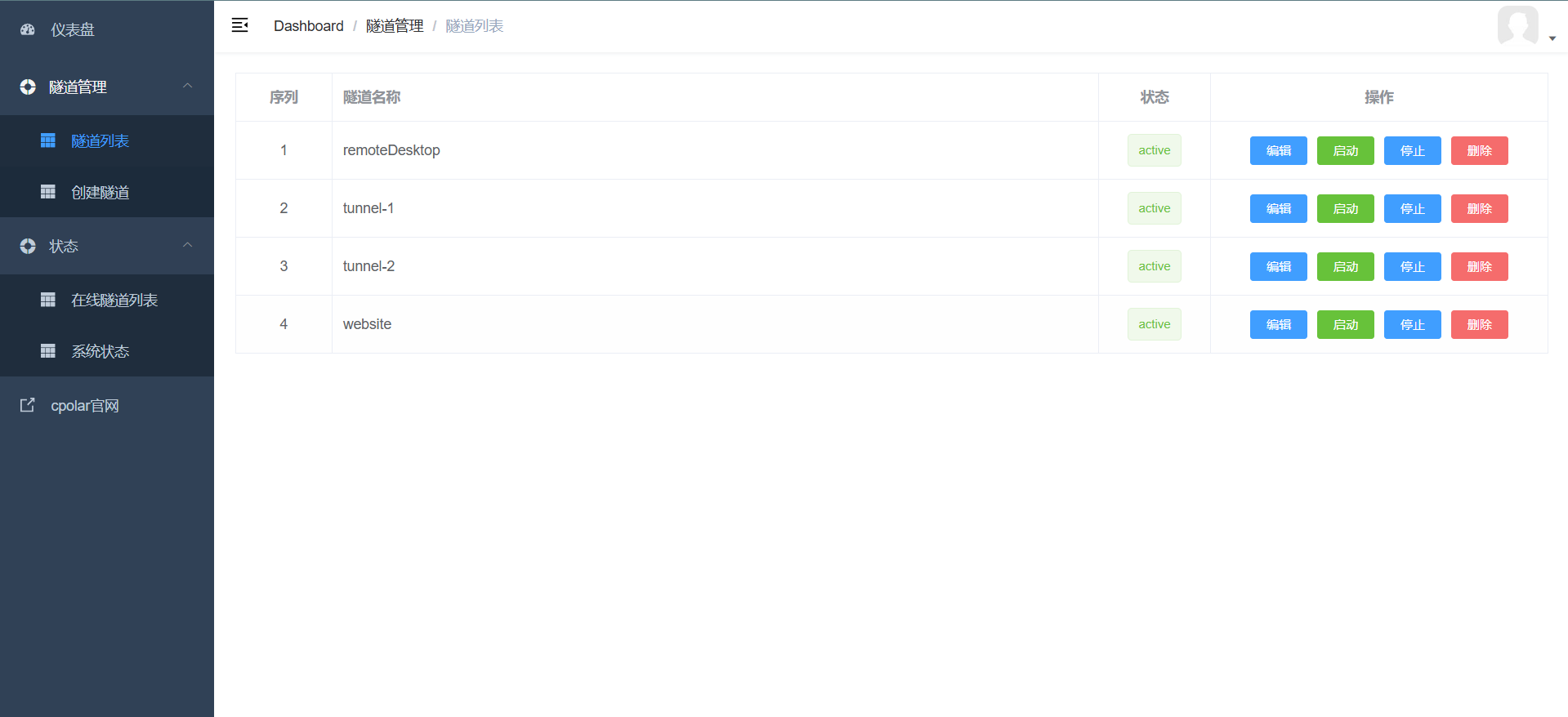
通过端口映射和隧道技术实现内网穿透引言在现代网络环境中,我们经常需要从外部网络访问内网资源。本文将介绍如何通过在路由器中设置端口映射,并使用cpolar创建隧道,来实现从外网访问内网中的私人电脑网站文件。
步骤一:设置端口映射和创建隧道首先,我们需要在路由器中添加一个端口映射。这一步骤将外网的端口映射到内网特定设备的特定端口上。
1234561. 登录到你的路由器管理界面。2. 找到“端口映射”或“端口转发”的设置选项。3. 添加一个新的端口映射规则,指定: - 外部端口(你希望 ...
Welcome to Hexo! This is your very first post. Check documentation for more info. If you get any problems when using Hexo, you can find the answer in troubleshooting or you can ask me on GitHub.
Quick StartCreate a new post1$ hexo new "My New Post"
More info: Writing
Run server1$ hexo server
More info: Server
Generate static files1$ hexo generate
More info: Generating
Deploy to remote sites1$ hexo deploy
More info: Deployment